Log Software
1. Change log
| ISS/REV | Date | Modifications | Created/modified by |
|---|---|---|---|
| 1/0 | 02/18/2016 | Design focus | Hwijae Kwo [email protected] |
2. Design focus
2.1 Using Uart
- Connecting shield and odroid by uart communication.
2.2 Handling all types of data
- Handling int, double, char, string types of data.
3. Concept design
3.1 Using Uart
- Using uart communication between shield and odroid.
- Easy to code with github opensource code “arduino-serial-lib”.
- Storing data simply using basic arduino library fuctions.
3.2 Handling all types of data
- There are all types of DataStore functions.
- void DataStore(char data, char logname), void DataStore(double data, char logname), void DataStore(int data, char logname)
4. Detail design
4.1 log.cpp
4.1.1 Using Uart
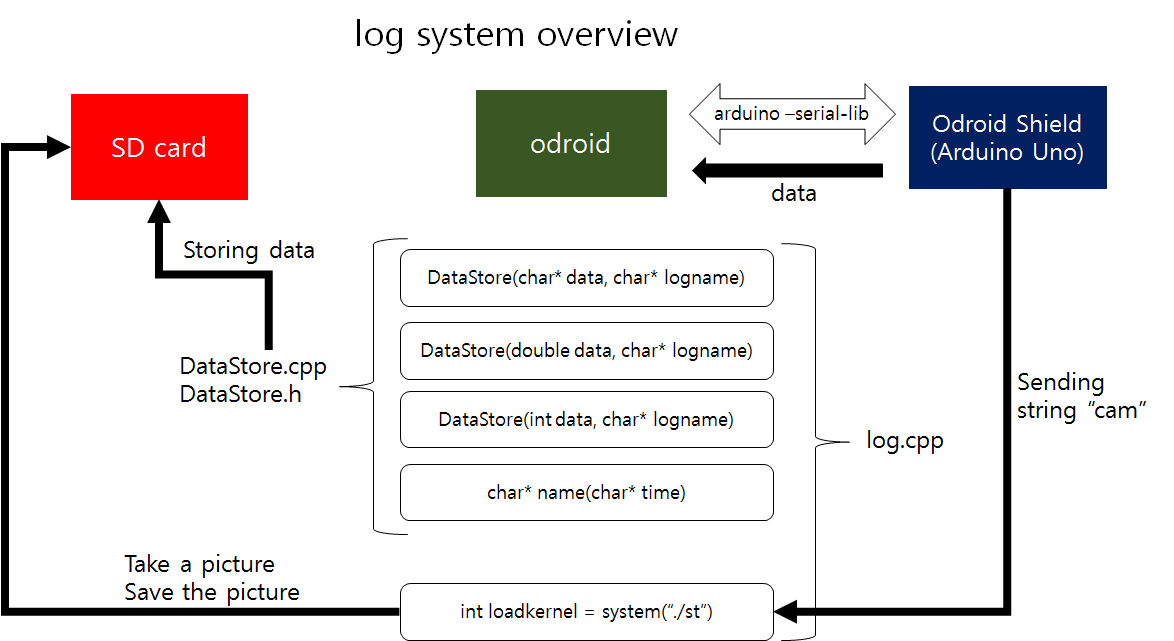
- We use “arduino-serial-lib”, github opensource code to connect odroid and Odroid shield. This code is based on the basic arduino IDE code, so it’s easy to use.
- Please refer the ARL15-D-30-07-Software System_code manual(arduino-serial-lib part) for more detail about the code
4.1.2 Handling all types of data
- There are all types of DataStore functions. void DataStore(char data, char logname), void DataStore(int data, char logname), void DataStore(double data, char logname)
- It can also save picture data. When the odroid shield sends the string “cam” to odroid, log.cpp takes a picture and save it.
4.1.3 More detail of DataStore
- When the odroid shield sends some data, it senses the data and save it as a “.txt” data.
- The name of the “.txt” file is the starting up time and date of the odroid.(ex, 20151123 13:12:33)
- It notifies the saving start point by storing “Odroid on” on the top of the file.
- When the odroid takes a picture, it saves the string “cam”, and the time of the moment
6. Results
6.1 Data
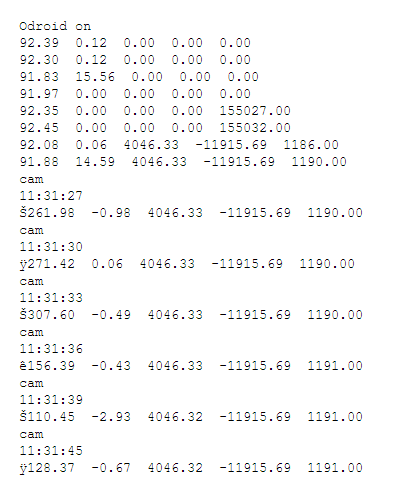
- We can save data which comes from odroid shield. The data storing form is same as the form which we mentioned before(4.1.3)
7. Reference
7.1 ARL15-D-30-07-Software System_code manual